
Start with a useful prompt
Start with this pattern:
Prompt to copy
Create a mind map from [source material] to help [audience] understand [question]. Group the main ideas into [branches]. Show [important relationships]. Keep labels short, put supporting detail in descriptions, and mark anything the source does not establish.
The seven prompts below adapt that pattern to common tasks. Replace the bracketed text with your own material. In a connected DeeplyClear workflow, ask your AI to create the saved map with DeeplyClear. You can also paste the material into the AI mind map generator.
1. Turn a project brief into a plan
Use this when requirements mix goals, proposed features, and unresolved decisions.
Prompt to copy
Create a DeeplyClear mind map from this project brief: [brief]. Put the project outcome at the center. Branch into users, intended outcomes, scope, dependencies, risks, and open decisions. Separate agreed requirements from suggestions. Connect each major feature to the outcome it supports. Do not invent owners or deadlines.
For a checkout project, “let customers retry safely” is an outcome; “disable the payment button” is a proposed implementation. Keep those distinct so the team can discuss whether the implementation achieves the outcome.
Check the result: Can you explain why each proposed feature belongs in the plan? A branch with no connection to an outcome may need clarification. Move committed work into your task tracker once the scope is agreed.
2. Extract decisions from meeting notes
Meeting notes often put an accepted decision next to an idea someone merely mentioned.
Prompt to copy
Turn these meeting notes into a DeeplyClear mind map: [notes]. Use branches for decisions, reasons, actions, unresolved questions, and dependencies. Include an owner or date only when the notes name one. Mark proposals as proposals. Connect each action to the decision or question that created it.
Check the result: Look at the decisions branch first. If the AI promoted a suggestion into a commitment, correct it before sharing. This is particularly useful when someone who missed the meeting will rely on the map.
For the input workflow, see creating a mind map from meeting notes.
3. Organize a research question
The important distinction in a research map is often between what a source reports and what you infer from it.
Prompt to copy
Build a DeeplyClear mind map around this research question: [question]. Use only the supplied sources: [sources]. Organize the map by themes, evidence, disagreements, limitations, and unanswered questions. Include source names or URLs in descriptions. Label interpretations separately from reported findings. Do not fill gaps with unsupported facts.
Check the result: Open the source behind a key claim. Confirm it supports the claim and that qualifications survived the summary. A short node label can hide uncertainty; use the description to retain it.
4. Compare a decision's options
Use this for a decision with competing priorities, such as whether to build a feature or integrate a service.
Prompt to copy
Map this decision in DeeplyClear: [decision and context]. Branch into options, decision criteria, known constraints, trade-offs, evidence, and unanswered questions. Connect each option to the criteria it satisfies or conflicts with. Keep unknown costs and effort estimates marked as unknown. Do not choose a winner unless the evidence supports one.
Check the result: Make sure the same criteria are applied to every option. A map helps expose relationships; a small comparison table may still be better for comparing several numerical values.
5. Understand a codebase
Give a coding assistant access to the relevant repository or provide the files yourself. A repository name alone is not enough to establish its architecture.
Prompt to copy
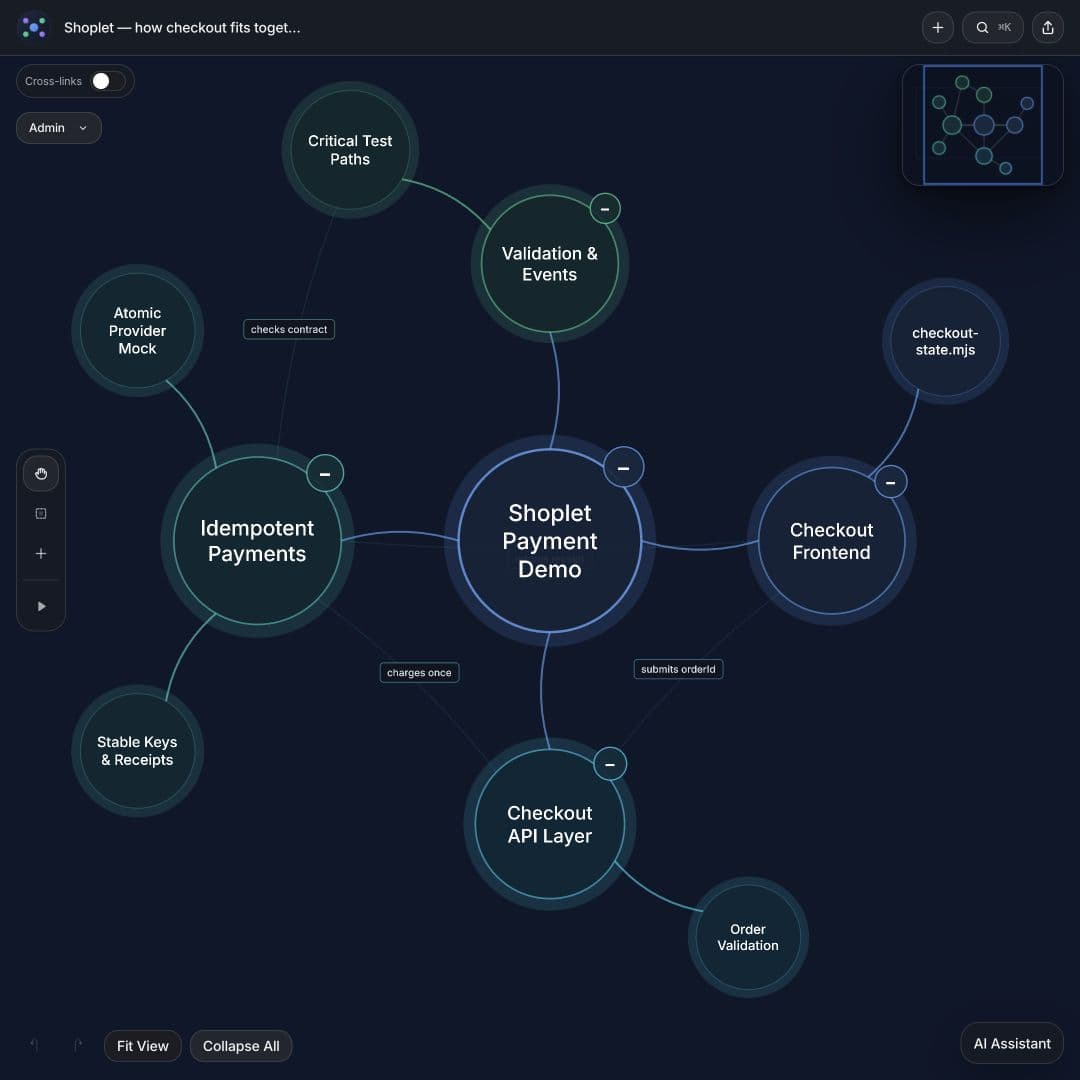
Inspect the supplied code before creating a DeeplyClear mind map. Show the main entry points, modules, data stores, external services, and tests. Trace one representative request across those branches. Include representative file paths in descriptions. Distinguish verified connections from assumptions, and identify the revision or snapshot used.
This interactive Shoplet example shows the intended level of detail. It represents a fictional checkout demo, not a production system.
Check the result: Follow one connection back into the code. Confirm that it exists and that the direction is right.
6. Explain an AI-generated code change
A change map should answer what changed and where it fits, rather than list every edited filename.
Prompt to copy
Create a DeeplyClear mind map for this diff and its surrounding code: [material]. Use branches for previous behavior, new behavior, affected components, assumptions, and verification. Connect the user-visible change to the code that implements it. Include relevant file paths. Separate tests that exist from tests you recommend. Mark unverified claims.
Check the result: Can you identify a concrete before-and-after example? If the map only says “improved reliability,” ask which failure is prevented and what enforces that behavior. The AI code review walkthrough works through this question with a checkout retry.
7. Plan an animated explanation
Use this after the map's content is accurate.
Prompt to copy
Suggest a short Clarity Tour for this DeeplyClear map. The audience is [audience], and the question is [question]. Begin with enough context to orient them, follow the relevant connections, explain one concrete example, and finish at the decision or takeaway. Suggest a short description for each stop. Leave unrelated branches for exploration afterward.
Check the result: Play the tour as someone seeing the topic for the first time. Each stop should explain why the next one matters. See the animated mind map presentation guide for a worked sequence.
Improve the map with one specific correction
When the first result feels wrong, identify the structural problem. “Make it better” gives the AI little to work with. Try “separate proposed actions from confirmed decisions,” “connect each risk to the component it affects,” or “replace implementation details with user outcomes in the first level.”
Start with the prompt closest to your task, supply the source, and check the important relationships. Create a map in DeeplyClear, or follow the AI connection guide to use it from your assistant.
FAQ
Common questions
What should an AI mind map prompt include?
Include the source material, the question to answer, the intended audience, and the relationships to preserve. Ask for short labels, supporting descriptions, and explicit uncertainty where the source is incomplete.
Can I use these prompts with my AI assistant?
Yes. Give the assistant the source material and connect DeeplyClear through a supported AI-tools workflow to save an editable map. A prompt alone does not establish a connection or grant access to your files.
How do I improve an inaccurate AI mind map?
Check the important nodes against the source. Give a specific correction, such as separating proposed actions from confirmed decisions or connecting each risk to the component it affects.
Next step
Use this workflow in DeeplyClear
Turn notes, docs, prompts, or product thinking into a map you can inspect, refine, and explain.